
You can ask three people for a WordPress website and get three very different prices. One wants £2,000, another wants £6,000, and the third is talking about £12,000 before you’ve even discussed the content.
It’s a fair question: what is the difference? They’re all using WordPress. You still need some pages, a contact form and a way to update things.
Usually, they haven’t priced the same job. One might expect you to choose a theme and supply everything. Another might be allowing time to work out the structure, design the pages, write custom code and move the old site over. You need to get underneath the word “website” before the numbers mean much.
Our starting point for a new website is £2,000. That’s for a build; fixing something, adding a feature or making changes to an existing site can cost less. We don’t currently charge VAT.
From there, the price depends on what needs doing. A roofer who needs to explain their services and take enquiries has a different job on their hands from a business taking payments, managing memberships and sending information to other systems.
Updated for Autumn 2026: I originally wrote this in April 2024. I’ve rewritten it with current budgeting guidance and more detail on what you’re paying for, including the costs after launch.
What should you budget for a WordPress website?
If you’re thinking of asking Blunt Notion to build a site, these figures should help you get a rough idea. They aren’t packages. I’d still need to talk through the work before giving you a quote.
| Planning budget | The sort of project it can support |
|---|---|
| £2,000–£4,000 | A smaller business website with straightforward features. You have most of the words and images ready, and we agree what is included before starting. |
| £4,000–£8,000 | More to design and build: perhaps separate layouts for services, projects and people, tools for editing them, or more content to move from an old site. |
| £8,000–£15,000+ | A more involved website or shop: payments, accounts, connections to other software, or a difficult move from an existing setup. Some projects will cost more than this. |
That’s the build itself. Check whether the quote also includes writing, photography, branding, paid software and support afterwards. When comparing suppliers, check VAT too: you want to compare what you’ll actually pay.
There are cheaper routes. You can build a WordPress site yourself or commission a small theme-based setup. There are also agencies whose projects start well above these figures. Neither tells you much about value until you know what is being supplied.
If £2,000 is your total budget including every ongoing cost, say that at the beginning. It changes what can sensibly be delivered.
What are you paying for if WordPress is free?
WordPress is open source. There isn’t a WordPress core licence fee to pay just to use it. This guide is about a self-hosted website built with that software; WordPress.com has its own hosting plans and commercial arrangements.
You’re paying for someone’s time to plan and build the website, plus the services needed to run it. Installing WordPress is a small part of that. Working out how customers will find your services, building the pages and getting your booking system to talk to your calendar can take much longer.
There’s the bit you use behind the scenes, too. If you add projects regularly, you should be able to enter the title, description and pictures without rebuilding the layout each time. Someone has to set that up and test it. It won’t be obvious from a screenshot, but it makes a difference when you’re the one updating the site.
What changes the price of a WordPress build?
The different things the website needs to publish
Page count is a starting point, but it can be misleading. Twenty articles using one template may be simpler than five pages with different interactive features.
A service business might need services, projects, team profiles and locations. Each needs a structure, a layout and a sensible way to edit it. Deciding how those pieces connect is part of the job, not an extra that starts after the design is approved.
Design and the way people use it
Before drawing up pages, I need to understand what someone is coming to the site for. Can they find the right service? Is there enough information to decide whether to contact you? What do they need to do next?
If you have a logo, brand guidelines, decent photographs and words you’re happy with, that helps. If we need to work on those as well, we need to allow for it. For branding, I work with a specialist collaborator where needed.
Complicated isn’t always better here. An animation might take a day to build and add very little. A clear explanation of a service might do far more for the person trying to choose a supplier.
Functionality and integrations
A contact form is a different job from a booking system that takes deposits, checks availability and updates another service.
Connecting two systems is where a seemingly small feature can turn into quite a job. Suppose a booking is paid for, but the calendar service is down. We need to decide what happens to that booking and how someone finds out. That behaviour needs building and testing too.
A maintained plugin might already handle the requirement well. If it does, writing our own version could waste your money. Where it doesn’t, custom development needs to include testing and a plan for looking after it.
Content, migration and the old website
“We’ll use the existing content” can hide a fair amount of work. Someone still has to review it, organise it, move it and check it in the new layouts.
On an existing website, useful URLs and search visibility matter too. Redirect planning, page mapping and checks around launch belong in the scope. Moving content without looking at those details can create problems that a polished new design won’t solve.
Testing and handover
A site can look finished before it is ready. Forms need checking. So do navigation, keyboard access, mobile layouts, error states and the parts connected to external services.
Training, access and a clear explanation of what happens next also take time. If one quote includes those things and another doesn’t, the headline prices aren’t directly comparable.
Is a bespoke WordPress website worth the extra cost?
Sometimes. It depends on what the extra work gives you.
A good existing theme can be a sensible choice for a simple requirement. A page builder can also be useful, particularly when you already have a working site and replacing it would achieve very little.
I usually build a custom theme. That means writing the code for the layouts and setting up the controls you’ll use to edit the content, rather than trying to make a bought theme fit. It’s useful when you need something specific, or when adapting an existing theme would involve more work than building what you need.
It doesn’t mean every plugin is bad or every custom build is fast. Performance depends on the implementation, hosting, images, scripts and the work the page is doing. A poorly built custom theme is still a poorly built website.
Ask what the custom work actually gives you. It might let your team publish information more easily, connect a system you rely on or build a layout a standard theme can’t handle well. There should be an answer beyond “it’s bespoke”.
I explain more of the technical side on the WordPress development page.
What does a WordPress website cost after launch?
The build is one part of the budget. Running the site is another, and improving it over time is a third. They may appear on the same invoice, but they aren’t the same service.
| Cost | What to establish before agreeing it |
|---|---|
| Domain | Who controls the account, what renewal costs and who is responsible for renewing it. |
| Hosting | The renewal price, resources, backups, support and what “managed” actually includes. |
| Paid licences | Which tools need renewing, whose account they use and what happens if you move supplier. |
| Maintenance | Who handles updates, checks, restores and problems; what is included when something breaks. |
| Changes and development | Whether new features and content work are included or quoted separately. |
| SEO and marketing | What continues beyond the technical and content foundations included in the build. |
I wouldn’t give every WordPress site the same monthly allowance. A service website with a contact form and a shop taking orders all day need different levels of care. Ask for the ongoing costs alongside the build quote, including renewal prices rather than introductory offers alone.
Hosting and maintenance can overlap. Check the inclusions so you don’t count backups or licences twice when comparing totals.
Security also involves more than buying a plugin. Updates, access controls, hosting configuration, backups and a recovery plan all matter. A security plugin can be part of that setup; it isn’t a substitute for it.
Blunt Notion can host and look after the site, or you can arrange that elsewhere. You own the website and the code that’s built for it. Any third-party tools still have their own licence terms, so we need to be clear about those as well.
Compare the cost over three years
To put some numbers to it, imagine a quote with these costs. These are example figures, not a package Blunt Notion sells:
- Initial build: £4,000
- Hosting and maintenance: £75 a month
- Domain and separate licences: £150 a year
Over three years, that is £7,150: £4,000 + £2,700 + £450. This example assumes three complete years of running costs, no price changes and no new development. Some suppliers bundle licences into their support fee, so check before adding them again.
Do that sum with the quotes you receive. Check for minimum contract lengths, renewal prices and separate licences. You might find the cheaper build costs more over three years, or that the more expensive one includes things you don’t need.
Keep a separate allowance for planned improvements. Looking after the website and adding a new booking system are different jobs.
What should a WordPress website quote include?
You don’t need to become a developer to compare proposals. You do need to know what the words mean in your particular project.
Before agreeing a build, ask:
- What is being designed and developed, and what is being reused?
- Which templates, content types and features are included?
- Who writes, supplies and uploads the content?
- What happens to existing pages, files and URLs?
- Which integrations and paid tools are required?
- What testing, accessibility work and training are included?
- What does the SEO work cover, and what would need ongoing work?
- Who owns the website, code and accounts, and how would a move to another supplier work?
- What will renew after launch, and what does support actually cover?
- What happens if the agreed scope changes?
“SEO included” deserves a follow-up question. Page structure, crawlable templates, metadata controls, useful internal links and redirect checks are important build foundations. Ask which of those are included, rather than accepting a plugin installation as the whole job.
Continuing research, content improvements and checking which pages attract relevant searches are separate work. On a small project, some of that may be phased. What matters is knowing what has been allowed for and who is responsible after launch.
Those foundations help search engines access and understand the site. They don’t guarantee indexing, a particular position or enquiries. If ongoing WordPress SEO is part of the proposal, it should have its own scope and a way to review progress.
How to reduce the cost without creating another problem
Before cutting features or shopping for cheaper hosting, work out what you actually need in the first version.
Agree what the first version needs to do. Prepare the content and images early. Decide who can approve work and keep feedback in one place. Reuse a good integration or working system when replacing it offers little benefit.
You can also phase a project. A service website might launch with the important services and enquiry routes, with a resource library following later. The first phase should still be complete enough to use properly.
If you already have a WordPress site, start with what is causing trouble. A new template, improved editor or a targeted technical fix may be enough. A rebuild becomes more sensible when the existing structure makes every change harder and more expensive.
For an online shop, I’d also look at whether Shopify would suit you better. WordPress is what we work with most, but that doesn’t make it the right answer to every brief.
Two examples of what changes the work
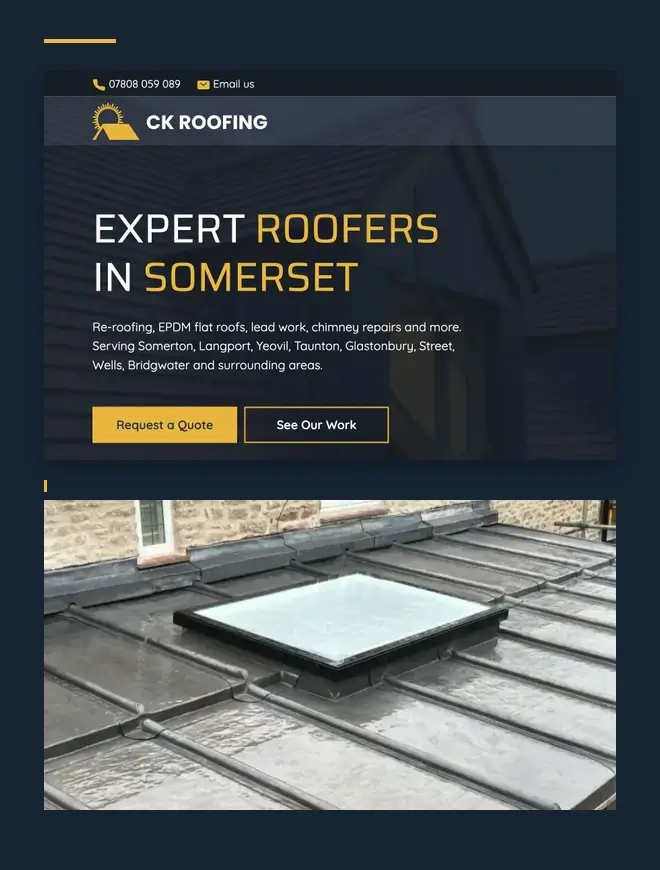
Take CK Roofing Somerset. This was their first website. People needed to see what roofing work they do, check whether they cover their area and get in touch. We designed and built the WordPress site around that, using their existing logo as a starting point.
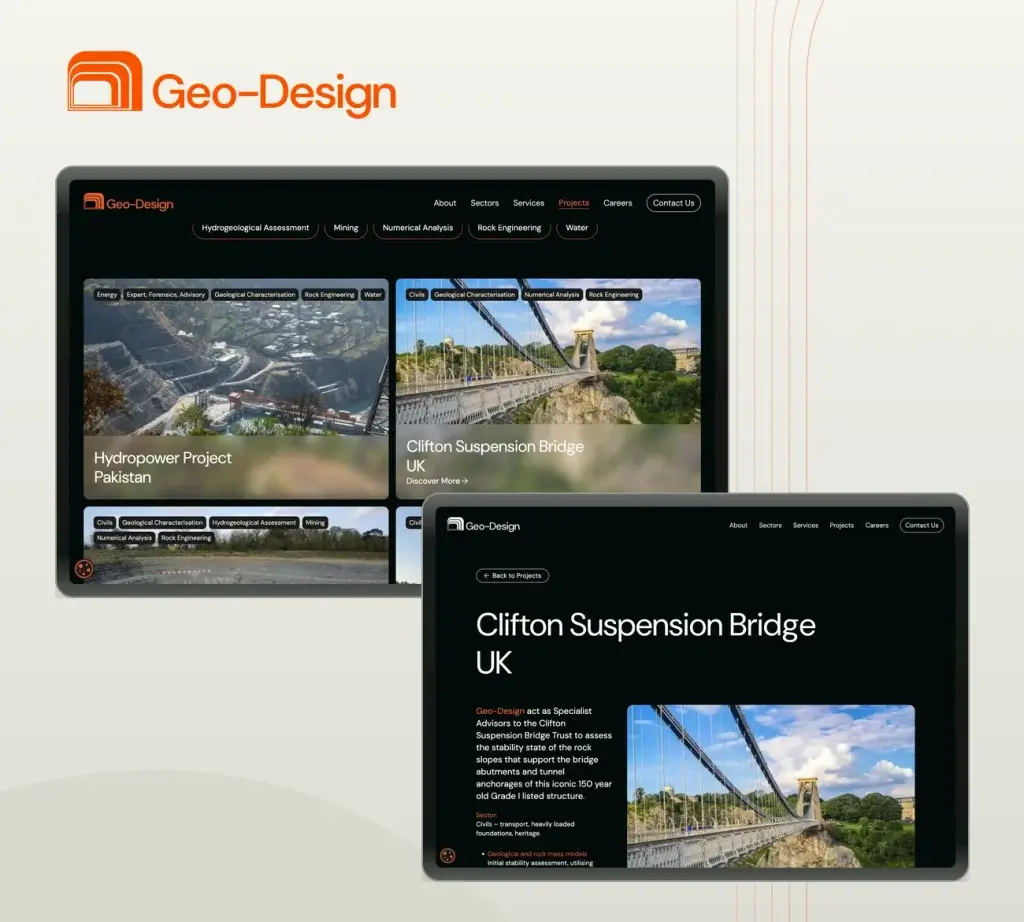
Geo-Design had more types of information to organise: engineering services, sectors, projects and the specialists doing the work. Those needed their own layouts and ways of connecting to each other. We designed and developed the WordPress website, with the branding created alongside.
So, what should you spend?
If you’re getting quotes, ask people to explain the work as well as the price. You should be able to understand what you’re buying without learning how to build it yourself.
If you’d like Blunt Notion to have a look, send over the website and a bit about what you need. Include a budget if you have one. It helps us work out what’s possible, what can wait and whether we’d be the right fit for the job.


